You may be able to view WhatsApp chats after losing account access only if another usable copy already exists. The result depends on whether the problem is a temporary logout, lost phone number, damaged device, account restriction or completed local archive. A cloud restore backup may still require the correct account, number and credentials. WhatsApp chat backup tool for offline access can keep previously saved local records readable, but it cannot collect data after access is gone.
Quick answer: If WABak completed a local backup before WhatsApp access was lost, the saved chats, supported media, contacts and authorized group-member records remain available in WABak for viewing, searching and export. WABak cannot retrieve data that was never backed up or synchronize new messages after the account becomes inaccessible.
“Losing access” can mean five different incidents
| Incident | Possible remaining source | Main risk |
|---|---|---|
| Temporary logout or session disconnect | Phone app, official backup, completed WABak archive | Reconnecting the account may still be possible |
| Lost or replaced phone number | Existing device, official restore copy, completed local archive | Verification and future restore may depend on the old number |
| Damaged or reset device | Cloud restore backup, another protected copy | Local-only data on the device may be gone |
| WhatsApp account restriction or ban | Data already saved outside the inaccessible account | New synchronization and in-app access may stop |
| Employee departure | Business-owned device/account and verified company archive | Customer context may leave with the employee |
If your specific situation is a WhatsApp ban, see WhatsApp Banned? What Happens to Your Chats for a dedicated guide to what happens to chats and backups.
Do not use one generic “recovery” promise for all of these cases. The available options and authorization differ.
What an official restore backup can do
WhatsApp’s supported backup is intended to restore compatible history inside WhatsApp. Depending on platform and settings, the process can require the expected phone number, cloud account and encrypted-backup credentials.
That backup is valuable for continuity, but it is not normally a directly readable folder. Losing the ability to verify the account may also prevent a normal restore even when cloud data exists.
See Local WhatsApp Backup vs Google Drive and iCloud for access-loss preparation for the difference between restoration and readable archiving.
What remains available in WABak
Completed WABak backups are stored on the computer running the client. Previously saved data can remain available in the Backup Center when the original WhatsApp account later becomes unavailable.
Depending on what was successfully backed up, users can:
- Search saved message text and supported fields.
- Review conversations in conversation or list view.
- Filter by account, contact, number, date, type or status.
- Export supported records to HTML, Excel.
- Open supported media saved during the backup.
- Review saved contact and authorized group-member records.
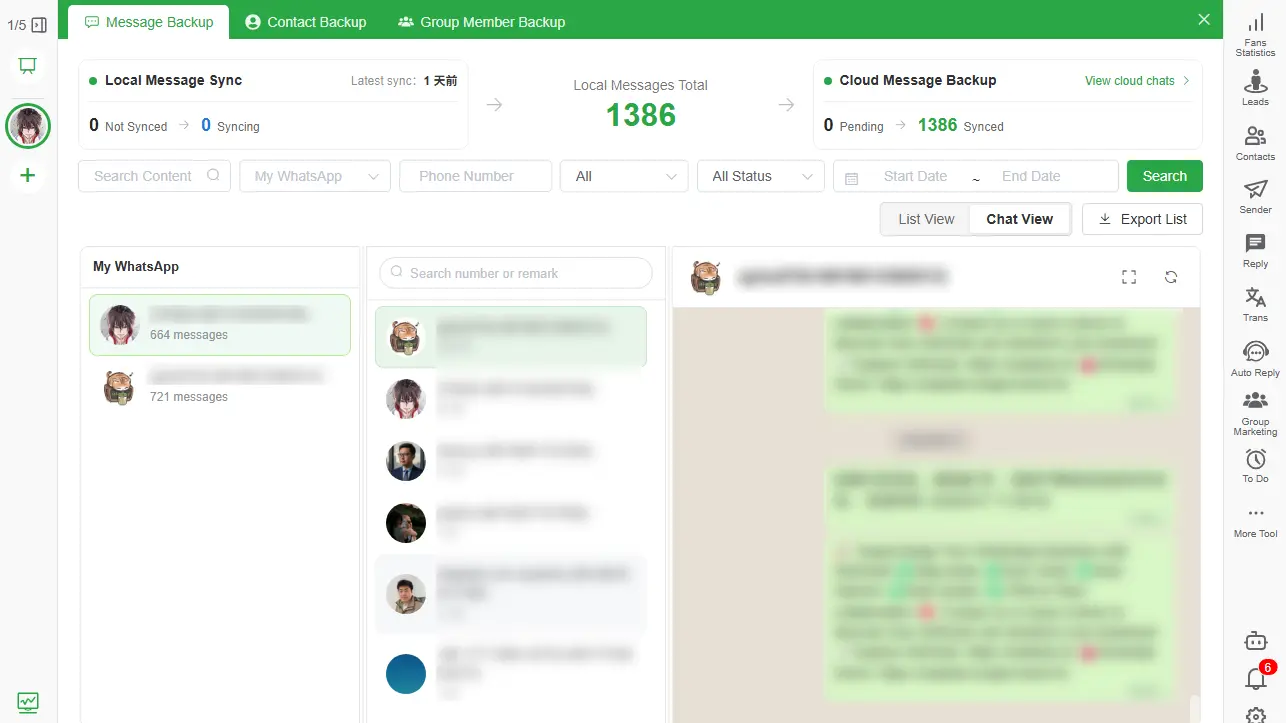
This availability applies only to the completed local copy. It does not restore control of the WhatsApp account.
This is also the main practical gap between backup tools built on different mechanisms: an on-demand browser-extension exporter generally has nothing left once the source session ends, while a persistent local Backup Center like WABak's keeps what it already saved. See WhatsApp Backup: Browser Extension vs Desktop Client for the full comparison.
Review the completed local archive first and verify the dates and attachments you need. Account recovery is a separate process: WABak cannot reactivate a restricted account or decrypt its cloud backup, and new messages require an accessible account.
Prepare before losing a number or device
Confirm account ownership
Record whether the phone number, SIM, device and cloud account belong to the company or an employee. Business continuity becomes fragile when critical customer chats depend on personal credentials.
Verify the official restore backup
Check the most recent successful backup time, account, phone number, media settings and encrypted-backup credential ownership. Do not wipe a working device just to test restoration.
Create a readable local archive
Back up accessible chats, contacts and managed group records to WABak. Search a known old and recent message, open a supported attachment and create a small test export.
Protect the computer copy
Enable disk encryption, restrict operating-system accounts and store any secondary copy according to the organization’s policy. Local storage is useful only when the device itself is protected.
Document the handover
Assign ownership for future backups, reviews and deletion. Use How to Back Up WhatsApp Business Chats Before an Employee Leaves for access-loss preparation when staff access is changing.
If access has already been lost
- Preserve every device and export that may still contain data.
- Do not factory-reset or uninstall WhatsApp on a device that still shows chats.
- Follow WhatsApp’s official account review, verification or restore process for the specific incident.
- Check the WABak Backup Center on the computer previously used for local backup.
- Copy critical local records to an approved protected location before repairing or replacing that computer.
- Document the missing date range honestly; do not imply that unsaved data was recovered.
If Google Drive reports no backup, use the safe Google Drive backup checklist before taking destructive action.
Business continuity checklist
- Business controls the required phone number and recovery accounts.
- Official backup shows a recent successful completion.
- WABak contains a recent searchable local copy.
- A known conversation and media file have been verified.
- Contacts and managed group records are included when authorized.
- HTML and spreadsheet sample exports open correctly.
- Computer access, encryption and retention are documented.
- A second responsible person knows the recovery and archive process.
The WhatsApp Chat Backup Checklist for Small Businesses for access-loss preparation provides a repeatable review cadence.
Frequently asked questions
Can I view chats after my WhatsApp account is banned?
You can view only copies that remain available outside the inaccessible account, such as a completed WABak local archive. WABak cannot access the account after a ban or recover unsaved data.
Can I restore a WhatsApp backup without the old phone number?
Official restore requirements can depend on the expected phone number and account credentials. Follow current WhatsApp instructions for the specific platform; a WABak export does not bypass verification.
Will WABak continue backing up after logout?
No. Previously completed local records remain available, but new synchronization requires accessible source data.
Can I search the local backup without internet access?
Previously saved WABak records are stored on the user’s computer and are designed for local viewing and search. Features that require reconnecting the source account remain dependent on access.
Does a local archive replace Google Drive or iCloud backup?
No. Keep an official restore backup for restoration and a local archive for reading, searching and export.
For the complete product workflow, see the WhatsApp chat backup tool for offline access.
Before changing account or device access, verify that the conversations and attachments you need are saved locally. Completed records remain available for review and supported exports; new messages require an accessible account, and the archive does not reactivate a restricted account.
Explore WhatsApp chat backup tool for offline access and create a verified local archive before account, device or employee access changes.
Follow the full WhatsApp Chat Backup to PC guide for access-loss preparation before an access incident occurs.
How to Export WhatsApp Chats to Excel
Filter and export accessible WhatsApp chat records to Excel for authorized review, handover and business organization while preserving context separately.
WhatsApp Backup Not Found in Google Drive: Causes and Safe Next Steps
A careful checklist for verifying the Google account, phone number, storage and restore conditions without overwriting important chat history.