Exporting WhatsApp chats to Excel turns accessible message records into rows that can be filtered, sorted and reviewed. This is useful for authorized handovers, customer-history checks and operational organization. It is not a WhatsApp restore format, and spreadsheet export should not replace a readable HTML conversation or a separate media archive when context matters.
Quick answer: Install a WhatsApp chat backup and Excel export tool, back up the accessible WhatsApp data to your computer, filter the messages by account, contact, number, date, type or status, then export the required records to Excel. Keep HTML for readable conversation context and export supported media separately.
Excel, HTML and TXT serve different purposes
| Format | Best use | Main strength | Important limitation |
|---|---|---|---|
| Excel | Review and operational handover | Familiar tables, sorting and filtering | Not a visual chat reconstruction |
| HTML | Reading a conversation in context | Browser-friendly layout and chronology | Less convenient for bulk analysis |
| TXT | Basic native chat export | Simple and widely readable | Limited structure and one chat at a time |
| Media folder | Images, video, audio and documents | Preserves supported files separately | Needs clear naming and access control |
Choose the format based on the later task. If a colleague needs to understand who said what and when, HTML may be better. If an authorized operations team needs to filter many records, Excel is usually more practical.
For the readable format, see How to Export WhatsApp Chats to HTML with Media for structured Excel exports.
What can be prepared before export
WABak’s local Backup Center is designed to narrow a data set before export. Depending on the available record type, users can work with filters such as:
- Connected WhatsApp account.
- Contact name or phone number.
- Message keyword.
- Date range.
- Message type.
- Available synchronization or record status.
The purpose is to export the smallest data set that serves an authorized business need. Avoid copying an entire account when a specific customer, date range or project is sufficient.
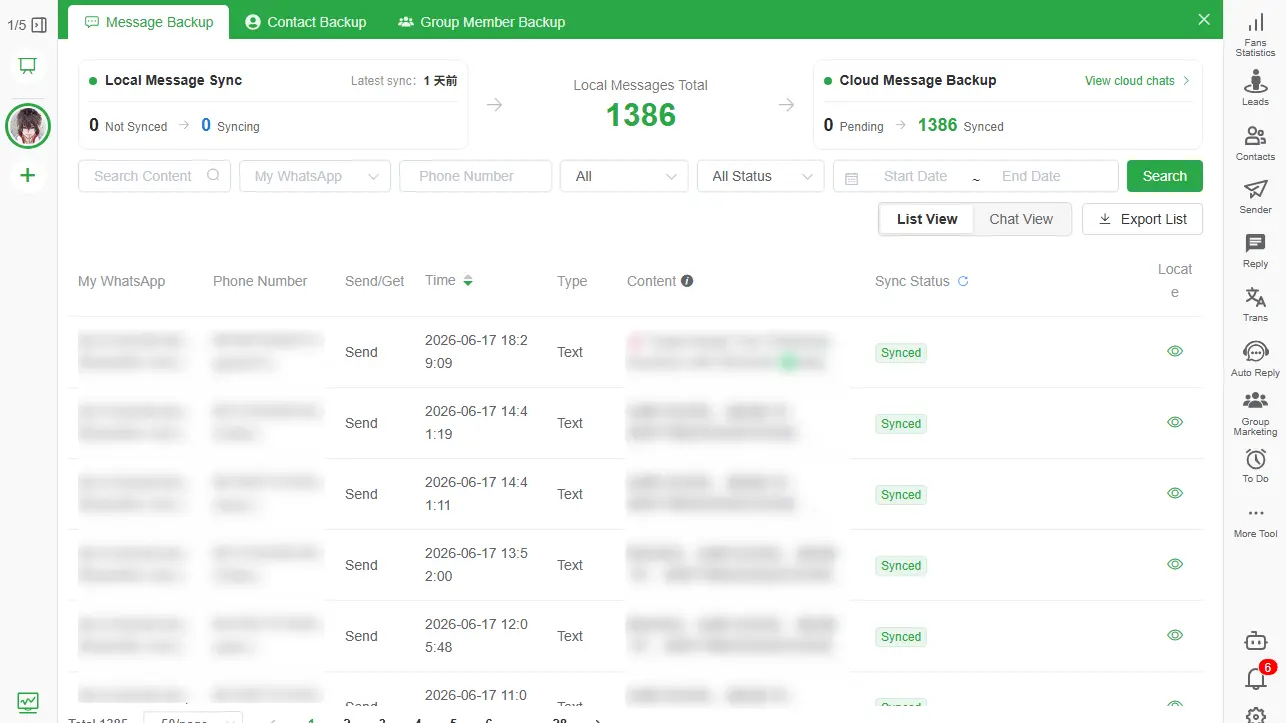
How to export WhatsApp chats to Excel with WABak
1. Back up accessible records locally
Download and install WABak on Windows or macOS, connect an account you are authorized to manage, and allow the required chat data to finish saving to the local Backup Center.
Do not begin with export. First verify that the expected account, date range and conversation are available locally.
2. Search for a known message
Use a customer name, phone number, invoice reference or another known phrase. Open the result in conversation view to confirm that it belongs to the right person and period.
3. Apply the narrowest useful filters
Select the relevant account, contact, date range, message type and status. Review the result count before export. A smaller, purpose-limited file is easier to verify and safer to share.
4. Choose Excel
Use Excel when reviewers need a familiar workbook for sorting, filtering or transferring approved fields into another business process. Confirm the columns and values by opening a small test export first.
5. Verify the output
Check the first and last timestamps, message direction, phone numbers, special characters and row count. Search the export for the known message used in step two.
6. Preserve context and media separately
Spreadsheet rows do not reproduce the complete visual conversation. Export important conversations to HTML when context is required. Save supported images, videos, audio and documents as separate files; do not assume they are embedded in Excel.
Practical uses for spreadsheet exports
Customer-service handover
Filter a customer’s messages by a defined date range, export the approved fields and pair the spreadsheet with an HTML conversation when the next agent needs full context.
Sales history review
Locate commitments, requested specifications or follow-up dates across accessible records. Do not turn the export into an unsolicited contact list.
Internal audit and quality review
Authorized reviewers can sort records by time, account or message type. An export is a working business record, not automatically certified legal evidence.
Approved CRM preparation
Excel can support an authorized import workflow after field mapping, deduplication and privacy review. WABak does not guarantee compatibility with every CRM, and exported message data should not be imported without a defined purpose.
Keep contacts and group members separate
Chat messages, contacts and group members are different data sets. Use the dedicated WABak areas when you need structured contact or group information rather than trying to infer every person from message text.
- Back up and export WhatsApp group members.
- Contact backup records can include available numbers, names, country codes, account relationships and last-message context.
This separation improves data quality and makes the retention purpose easier to explain.
Privacy checklist before sharing a spreadsheet
- Confirm the business purpose and authorization.
- Export only the fields and date range required.
- Remove unrelated personal conversations.
- Store the file in an approved encrypted location.
- Restrict access to named reviewers.
- Define when the export will be deleted.
- Avoid personal cloud-sync folders unless approved.
Local storage gives the user control, but it does not make every handling decision safe automatically.
Frequently asked questions
Can WhatsApp export chats directly to Excel?
WhatsApp’s native export commonly produces a text-based chat package rather than a structured multi-record Excel archive. WABak can export supported locally backed-up records to spreadsheet formats.
When should I use Excel instead of HTML?
Use Excel to filter and review message fields in rows. Use HTML when conversation order and a readable chat layout matter more. Neither format restores data into WhatsApp.
Are photos and videos stored inside the spreadsheet?
Treat supported media as a separate export. Verify the media folder rather than assuming files are embedded in spreadsheet cells.
Can an Excel export be restored into WhatsApp?
No. Spreadsheet exports are for authorized review and organization, not restoration into WhatsApp.
Can I export only one customer or date range?
Use WABak’s available search and filters before exporting. Always verify the result count and a sample record.
Related WhatsApp backup guides
For the complete product workflow, see the WhatsApp chat backup and Excel export tool.
Export completed records from the Backup Center, then check a sample of columns and rows before sharing the spreadsheet. Save any required media separately and set access permissions for the files. Excel is a record for review, not a WhatsApp restore file.
Read WhatsApp Backup vs Export for structured Excel exports for the broader distinction, or explore WhatsApp chat backup and Excel export tool to create and test a purpose-limited local export.
Start with the broader WhatsApp Chat Backup to PC guide for structured Excel exports when you still need to create the local archive.
How to Back Up Saved and Unsaved WhatsApp Contacts
Preserve accessible WhatsApp numbers and contact context without confusing phone contacts, chat participants and group members.
Can You View WhatsApp Chats After Losing WhatsApp Account Access?
What remains accessible depends on the incident and whether a readable local backup was completed before access was lost.