WhatsApp Backup Software for PC and Mac

WhatsApp Chat Backup for Messages, Contacts & Group Members

Back up your WhatsApp chats, media files, contacts and group members on your computer. Search your backup, view conversations and export data to HTML or Excel whenever you need it.

  • Windows & macOS
  • Local backup storage
  • HTML, Excel & media export
WABak Backup Center
Local messages
Pending1 syncing
Total backup
1,385
Export ready
MediaIncluded
OOlivia (+1 202 555 0134)
2026/06/17

Can you send the invoice from last month?

Found it in the backup. Exporting the HTML thread now.

Great, please keep the media files too.

Protect business-critical data

Protect Your WhatsApp Chat Backup Before You Lose Access

Important conversations and contacts can disappear when an account, device or team member is no longer available. A searchable local backup keeps your existing business records within reach.

A WhatsApp account is banned, logged out or no longer accessible.

A phone or computer is damaged, replaced or unexpectedly reset.

A team member leaves before customer conversations are handed over.

Contacts, group members and media files cannot be recreated later.

Data that has already been saved locally remains available in WABak for viewing, searching and export if you later lose access to WhatsApp. WABak cannot retrieve data that was never backed up.

Complete message backup

WhatsApp Chat Backup with Search, Preview & Export

Preserve message history and media context in a backup designed to be searched and used—not simply stored.

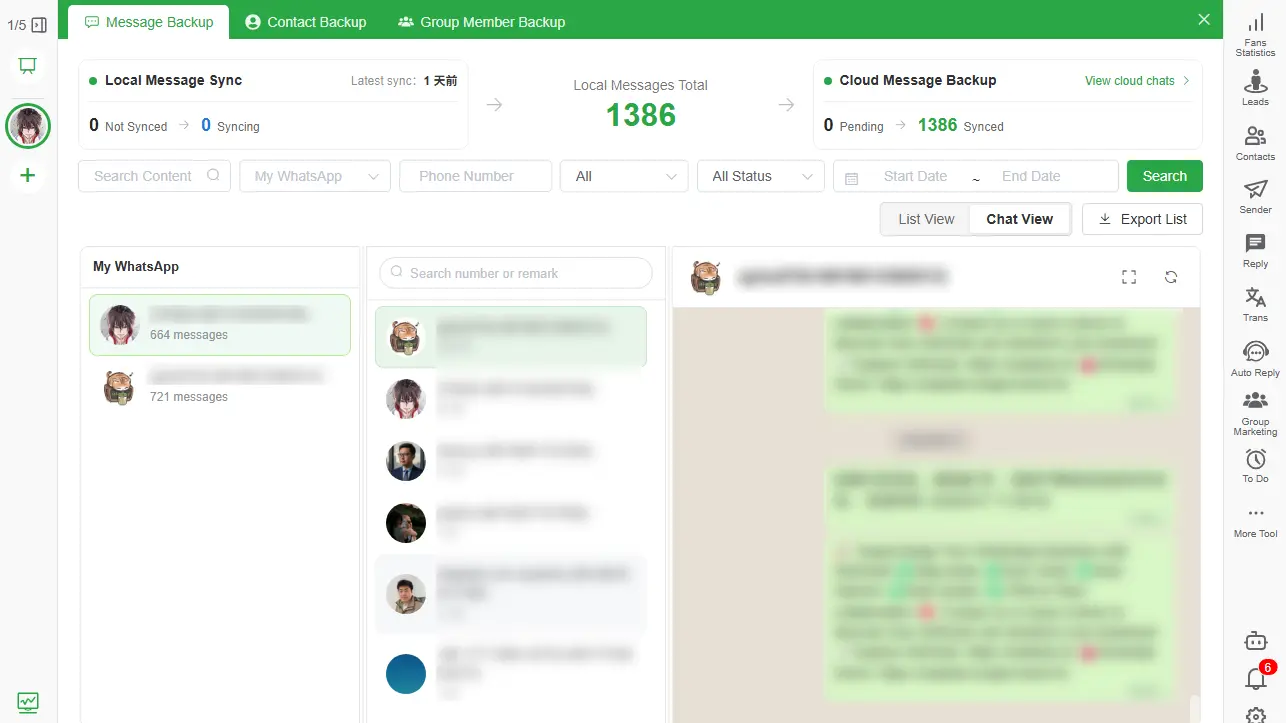
WhatsApp Chat Backup shown in conversation view
Conversation view preserves the context of each backed-up chat.
WhatsApp Message Backup shown in searchable list view
List view helps teams search, filter and review messages at scale.
  • Back up messages, timestamps and supported media files.
  • Read history in a familiar conversation view.
  • Audit large message sets in a structured list view.
  • Filter by keyword, account, contact, date, type and status.
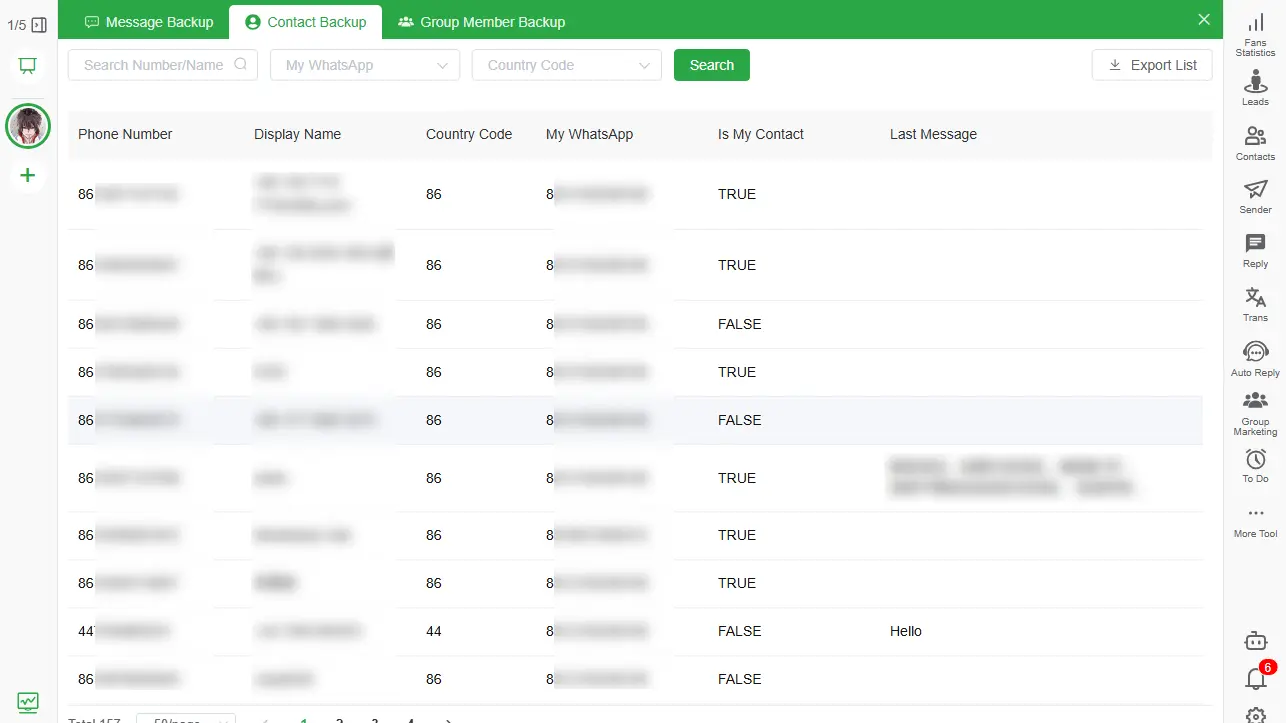
WhatsApp Contact Backup list with search and export controls

Contact data protection

WhatsApp Contact Backup for Saved & Unsaved Numbers

Keep a structured copy of the people connected to your WhatsApp accounts, including contacts that were never saved to a phone address book.

  • Back up phone numbers, names, account ownership and last-message context.
  • Keep both saved and unsaved WhatsApp contacts.
  • Search by account, country code, name or phone number.
  • Export a clean contact list for records or business workflows.

Community data protection

WhatsApp Group Member Backup & Contact Export

Preserve valuable group relationships before memberships change or access disappears.

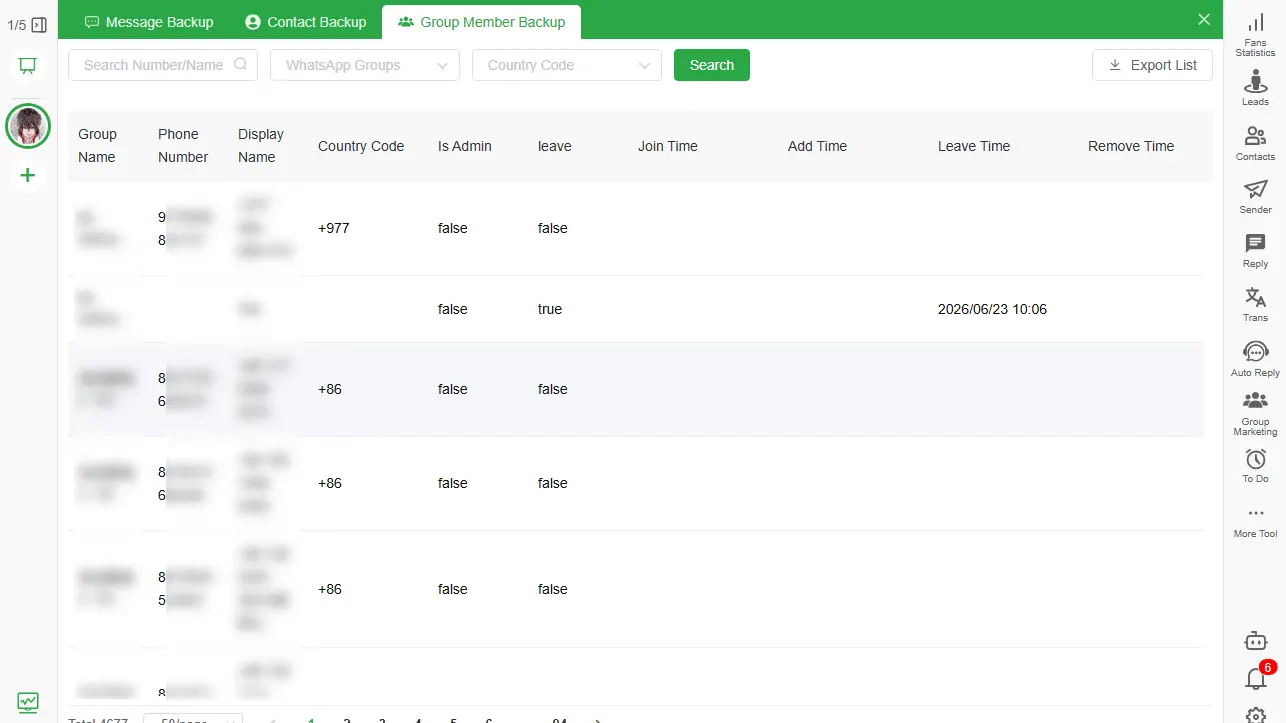
  • Back up group names, member numbers, nicknames and admin status.
  • Retain available join, leave and removal information.
  • Search by WhatsApp group, country code or member number.
  • Export group members to Excel or CSV for authorized business use.
WhatsApp Group Member Backup list with member details

Accessible after backup

Search and View Your WhatsApp Backup Anytime

A WhatsApp chat backup is only useful when you can find what you need.

WABak turns locally saved history into a practical archive for daily work, handovers and account emergencies.

Search text across previously backed-up conversations.

Switch between conversation view and list view.

Filter by account, contact, date, message type and status.

Continue viewing existing local backups after losing account access.

Portable business records

Export WhatsApp Chat Backup to HTML, Excel & Media Files

Move backed-up data into formats that are useful for reading, analysis, CRM work and long-term records.

Readable HTML

Export WhatsApp chat to HTML while preserving an easy-to-read conversation layout.

Excel & CSV

Filter, analyze, archive or prepare structured data for approved CRM workflows.

Media Files

Back up supported WhatsApp photos, videos, audio, documents and other attachments.

Contacts & Members

Export structured contact and group-member fields instead of copying numbers manually.

Local-first privacy

Private WhatsApp Chat Backup Stored on Your Computer

Sensitive customer and business conversations deserve clear ownership. WABak keeps local backup and access under your control.

Backed-up data is stored on your own computer.

You decide when to save, view, search and export.

The core backup workflow does not depend on cloud backup.

Designed for customer conversations, sales records and sensitive operations.

Simple desktop workflow

How to Back Up WhatsApp Chats with WABak

Create a usable local WhatsApp backup in three straightforward steps.

  1. 01

    Download and install WABak

    Install the WABak desktop client on a supported Windows or macOS computer.

  2. 02

    Connect WhatsApp and select data

    Connect the account you control and choose chats, contacts or group members to back up.

  3. 03

    Search, view and export

    Use the local Backup Center to find records and export them in the format you need.

Built for valuable conversations

WhatsApp Backup for Business-Critical Conversations

Protect the WhatsApp data that supports revenue, customer service and operational continuity.

Customer support records

Keep service conversations available for escalations, quality review and case handover.

Sales contacts and history

Preserve prospect details, customer context and the messages behind each opportunity.

Communities and group members

Maintain authorized records of group participants before memberships or roles change.

Multi-account operations

Give teams a consistent local process for account transitions, audits and business continuity.

Common questions

WhatsApp Chat Backup FAQ

Install WABak on Windows or macOS, connect the WhatsApp account you control, and select the chats you want to save. The local Backup Center then lets you search, view and export the backed-up data.

Yes, data that was successfully saved locally before access was lost can still be viewed, searched and exported in WABak. Data that was never backed up cannot be recovered by WABak.

WABak can preserve supported media associated with backed-up messages, including photos, videos, audio and documents. Availability depends on the media being accessible when the backup is created.

Open the backed-up conversation in WABak, choose the export action and select HTML. The resulting file keeps a readable conversation layout for offline access and archiving.

Use Contact Backup to collect contacts associated with the connected account. WABak keeps both saved and unsaved numbers and lets you filter them before export.

Yes. Group Member Backup preserves available member numbers, nicknames, group details and admin status, then exports structured records to Excel or CSV.

The core WABak backup is stored locally on the computer running the desktop client, giving you direct control over access and export.

Cloud backup is not required for the core local backup workflow described on this page. Your backed-up records remain on your computer unless you deliberately move or share exported files.

Start Your WhatsApp Chat Backup Before Data Is Lost

Protect chats, contacts, group members and media files with a searchable local backup.

Download WABak