A WhatsApp contact backup should preserve more than names already saved in the phone address book. Business conversations often include unsaved customer numbers, contacts associated with different WhatsApp accounts and people whose last-message context matters during a handover. A structured local backup makes these accessible records searchable and exportable without treating every number as a marketing lead.
Quick answer: Use the WhatsApp contact backup tool in WABak to save accessible contact numbers, names, country codes, account relationships and available last-message context on your computer. Search by account, country code, name or number, then export only the records your organization is authorized to retain.
Understand the three kinds of people data
Phone address-book contacts
These are names and numbers stored in the device’s contacts app. They may synchronize through Apple, Google or another account independently of WhatsApp.
WhatsApp conversation contacts
These are people visible through accessible WhatsApp conversations. Some are saved in the address book; others appear only as phone numbers or profile names. An unsaved number can still be operationally important if it belongs to a customer conversation.
WhatsApp group members
Group participants belong to a different record set. A member can appear in several groups and may not have a direct conversation with the account. Use the dedicated WhatsApp Group Member Backup guide for saved and unsaved contact archives for those records.
Do not merge all three sets blindly. Their source, authorization and retention purpose may differ.
What WABak Contact Backup can preserve
For accessible contacts and supported fields, WABak can retain:
- Contact phone number.
- Available nickname or display name.
- Country code.
- The related WhatsApp account.
- Saved or unsaved contact status where available.
- Available last-message context.
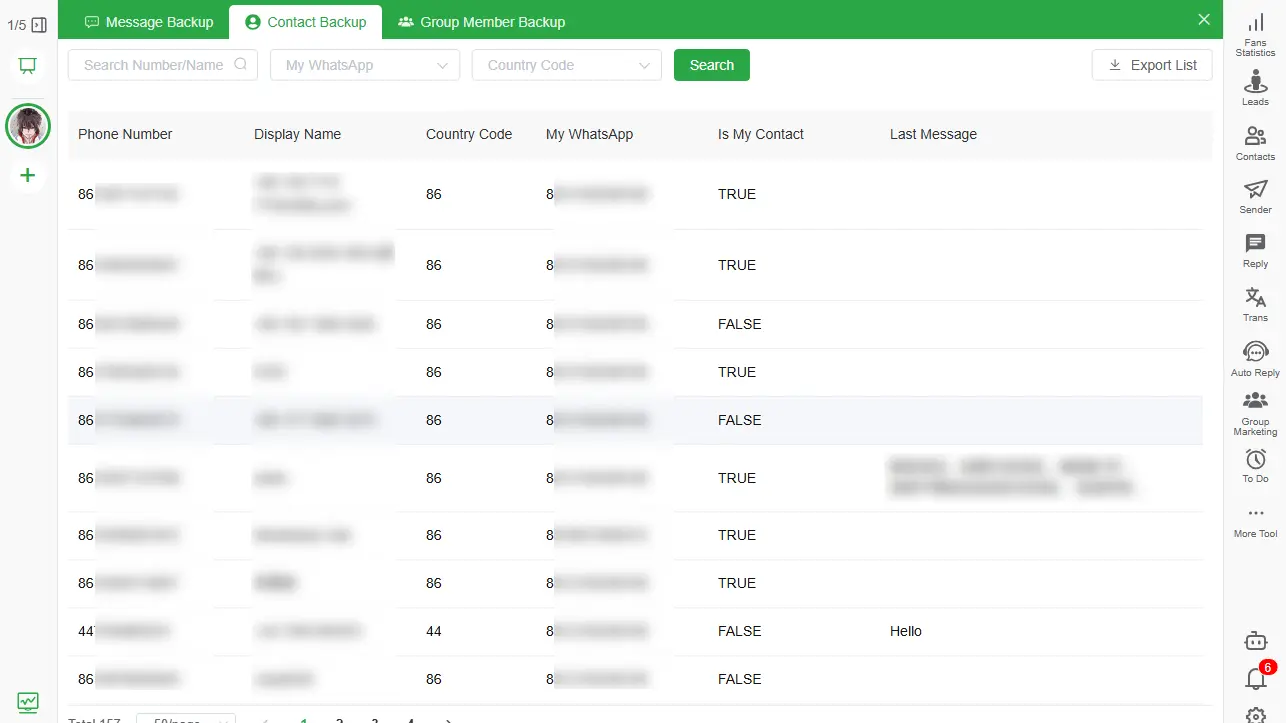
Product fields can evolve, so verify a sample export rather than assuming every source exposes identical details.
How to back up saved and unsaved WhatsApp contacts
1. Define the authorized scope
List the business-owned WhatsApp accounts and the reason for retaining contact records. Exclude personal accounts and unrelated conversations.
2. Install WABak and connect the account
Download WABak for Windows or macOS. Connect only an account you are authorized to manage and allow accessible contact records to finish saving locally.
3. Review the Contact Backup area
Confirm that the expected WhatsApp account appears. Compare several known saved contacts and unsaved customer numbers with the source account.
4. Search and filter
Use the WhatsApp account, country code, nickname or full/partial phone number to find records. Filtering before export reduces unnecessary data collection.
5. Export a small test file
Open the output and check number formatting, country codes, names, account ownership and available last-message fields. Spreadsheet software can alter long numbers, so verify that phone numbers remain intact.
6. Protect and retain the file appropriately
Store the export in an approved encrypted location with restricted access. Set a deletion or review date based on the business purpose.
Why unsaved numbers are easy to lose
An unsaved customer may remain visible only because a chat still exists. If the account becomes inaccessible, the employee leaves or the device is reset, the business may lose both the conversation and the number’s context.
Saving every number to a personal phone address book is not a complete business process. It mixes private and business contacts, provides little account ownership information and may not preserve the last interaction. A local contact archive keeps the approved records associated with their source account.
Contact backup before an employee handover
Before access changes:
- Confirm which WhatsApp accounts belong to the business.
- Back up accessible chats and contacts.
- Identify unsaved numbers with active customer conversations.
- Export only the approved contact set.
- Pair important contacts with readable HTML conversation history.
- Revoke access and apply the retention policy after verification.
Use the full WhatsApp Business handover guide for saved and unsaved contact archives for the complete three-stage process.
Contact export is not permission to message
A phone number appearing in an authorized archive does not automatically grant permission for marketing, bulk outreach or reuse in another context. Do not use WABak to scrape groups, bypass privacy controls or build unsolicited lead lists.
Before importing contacts into another business system, check:
- The original collection purpose.
- Applicable notices and consent requirements.
- Who may access the export.
- Whether every field is necessary.
- How duplicates and outdated records will be handled.
- When the records should be deleted.
Use chat, contact and group backups together
Each WABak area answers a different question:
- Chat Backup: what was said, when and with which supported media.
- Contact Backup: which accessible direct contacts and numbers are associated with an account.
- Group Member Backup: which available members and roles belong to managed groups.
A WhatsApp Chat Backup to PC for saved and unsaved contact archives can combine these record types in one local backup workflow without pretending that they are the same data.
Frequently asked questions
Does WhatsApp back up unsaved contacts?
Official WhatsApp restore backups focus on restoring app data, not producing a structured list of saved and unsaved business contacts. WABak Contact Backup is designed for local review and export of accessible records.
Can WABak save numbers that are not in my phone contacts?
It can retain supported unsaved-number records that are accessible through the connected WhatsApp account. Availability depends on the source data.
Can I search contacts by country code?
WABak supports filtering available contact records by account, country code, name or number.
Are group members included in Contact Backup?
Use the separate Group Member Backup area for structured group records. Do not assume every group participant is a direct contact.
Can I restore the exported contacts into WhatsApp?
The export is a structured archive, not a WhatsApp restore package. Any later import into an address book or CRM requires a separate authorized workflow.
For the complete product workflow, see the WhatsApp contact backup tool.
Save contacts while the account is accessible, check the available numbers and names, and store the export with appropriate access permissions. Obtain the necessary consent separately before using contact details for outreach.
Use the small-business WhatsApp backup checklist for saved and unsaved contact archives to verify the wider workflow, then explore WhatsApp contact backup tool to create a searchable local contact archive.
WhatsApp Backup: Browser Extension vs Desktop Client
Compare how browser-extension WhatsApp exporters and a dedicated desktop client differ on multi-account backup, real-time sync and access after an account is lost.
How to Export WhatsApp Chats to Excel
Filter and export accessible WhatsApp chat records to Excel for authorized review, handover and business organization while preserving context separately.