Seeing “No backup found” does not always mean the same thing. The backup may be under another Google account, tied to another phone number, missing from the normal Drive file list, incomplete, expired or no longer compatible with the restore attempt. Start by protecting the old phone and any existing data, then check each dependency before deleting, reinstalling or creating a new backup.
Quick answer: Confirm the Google account, phone number, latest successful backup time, Google storage and WhatsApp restore requirements. Do not delete the old backup or wipe the old phone while investigating. local WhatsApp backup software for readable archives cannot open or repair a Google Drive restore backup, but it can create a separate, readable local archive while chats are still accessible.
First, do not overwrite the data you still have
Troubleshooting becomes dangerous when every step changes the source. Before doing anything destructive:
- Keep the old phone powered and connected if it still contains the chats.
- Do not clear WhatsApp storage, factory-reset the phone or uninstall the app merely to test a theory.
- Do not delete a Google One WhatsApp backup to “refresh” it.
- Do not create an empty or incomplete backup from a newly installed account until you understand what is already stored.
- Record the phone number, Google account, backup date, backup size and any encryption credentials you control.
Google warns that deleting a WhatsApp backup is permanent. Its current Google One storage guidance also explains that Android WhatsApp backups count toward Google Account storage and can be managed through Google One.
Why the backup does not appear in My Drive
A WhatsApp backup is not a normal folder or ZIP file. It is app-managed backup data intended for restoration through WhatsApp. It therefore does not behave like a document stored in My Drive: you cannot browse individual chats, preview messages or download selected media from the Drive file list.
Use the Google One WhatsApp backup management area to check whether the account reports a backup. Treat this as evidence that a backup record exists, not proof that every required chat and attachment can be restored.
If your actual goal is to read messages on a computer, see How to View and Search a WhatsApp Backup on PC. A restore backup and a readable archive solve different problems.
Check the Google account
The most common safe check is also the easiest: verify the exact Google account selected inside WhatsApp and compare it with the account open in Google One.
People often have separate personal, work and legacy accounts on one Android phone. A backup created under one account will not be discovered simply because another account has enough storage. For managed Google Workspace accounts, an administrator may also control access to third-party app backups.
Write down the full email address rather than relying on the profile photo. If several accounts are present, inspect them without deleting anything.
Check the phone number and WhatsApp edition
Restore workflows normally depend on the expected phone number and account context. A changed country code, replaced SIM, migrated business number or attempt to restore WhatsApp Messenger data into a different setup can prevent detection.
Confirm:
- The full international phone number used when the backup was created.
- Whether the source used WhatsApp Messenger or WhatsApp Business.
- Whether the number is currently able to complete verification.
- Whether a number-change workflow was completed before the last backup.
Do not treat possession of the Google account alone as sufficient proof that the backup can be restored.
Check the last successful backup, not the scheduled time
“Daily backup” is a schedule, not a completion receipt. On the source phone, look for the latest successful backup time and compare it with the messages you need.
A backup can fail because of insufficient Google storage, insufficient device storage, an interrupted connection, restricted background activity or an unfinished media upload. Google’s storage page notes that videos often account for much of the backup size. If you change media settings, understand that the next backup may replace the previous state.
Distinguish three different failures
| Symptom | What it usually means | Safe next step |
|---|---|---|
| Backup not visible in My Drive | Expected behavior for app-managed data | Check Google One backup management and the selected account |
| WhatsApp says no backup found | Account, number, app or restore requirements may not match | Verify every identity and platform requirement before reinstalling again |
| Backup detected but restore fails | The backup exists, but download, credentials, storage or processing failed | Preserve the source phone and follow current official troubleshooting |
These cases require different actions. Repeating reinstallations does not solve an identity mismatch and can remove valuable local data.
Check storage, connection and encryption credentials
Verify free space in both places involved in the restore: the Google account and the destination phone. A large backup may need substantial temporary local space while WhatsApp downloads and processes messages and media.
Use a stable network, keep the device powered and update the official WhatsApp app and required Google services. If end-to-end encrypted backup is enabled, make sure the required password, key or supported credential is available. WABak cannot bypass these protections.
Meta describes end-to-end encrypted backups as an optional additional protection for cloud backups. Read the current Meta explanation of encrypted WhatsApp backups before changing encryption settings.
What WABak can and cannot do
WABak does not connect to Google Drive to decrypt, repair or restore its WhatsApp backup. It cannot recover a deleted backup and cannot reconstruct messages that are no longer accessible.
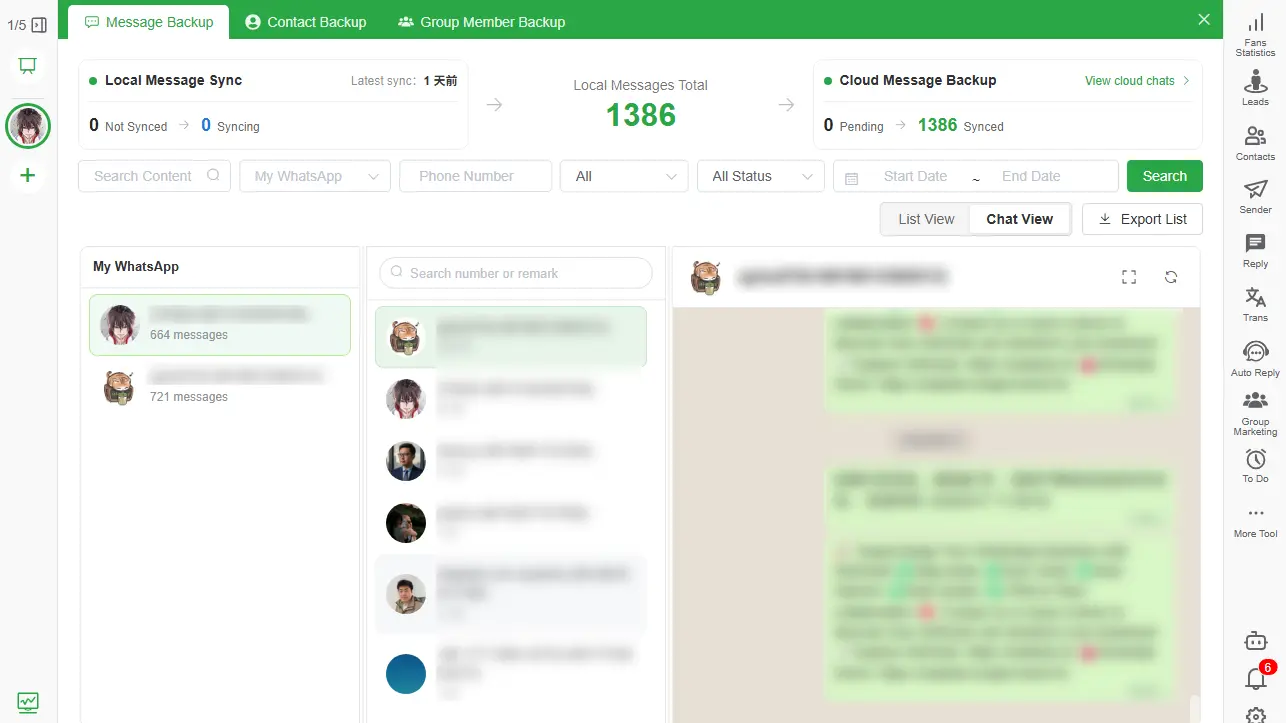
WABak is useful earlier, while the WhatsApp account and data remain available. It can save accessible chats, supported media, contacts and authorized group-member records to the computer so they can later be searched, viewed and exported independently of the cloud restore workflow.
For a complete comparison, read Local WhatsApp Backup vs Google Drive and iCloud for Google Drive backup troubleshooting and WhatsApp Backup vs Export for Google Drive backup troubleshooting.
Create a safer two-purpose backup strategy
When access is still available, use two verified workflows:
- Keep the official WhatsApp backup for supported restoration.
- Create a WABak local archive for reading, searching and business export.
- Search a known old and recent message in the local Backup Center.
- Open a supported media file and export a small HTML or spreadsheet sample.
- Protect the computer with disk encryption, access controls and an approved retention policy.
The local archive does not replace disaster recovery, and the cloud restore backup does not replace a readable business record.
Frequently asked questions
Why can’t I see my WhatsApp backup as a file in Google Drive?
It is app-managed backup data, not a normal My Drive document. Use the Google One backup management interface to inspect the available backup record.
Can WABak download my WhatsApp backup from Google Drive?
No. WABak does not decrypt, download, repair or restore WhatsApp cloud backups.
Will reinstalling WhatsApp make the backup appear?
Not necessarily. Reinstallation does not fix the wrong Google account, phone number, app context, missing credentials or a deleted backup. It can also put remaining local data at risk.
Can I read Google Drive WhatsApp messages on a PC?
Not directly as ordinary files. A WABak archive created while the chats are accessible is designed for reading and searching on the computer.
What should I do if the old phone still has the chats?
Preserve the phone, verify an official backup and create a separate readable archive before wiping, trading in or resetting it.
For the complete product workflow, see the local WhatsApp backup software for readable archives.
Before deleting or replacing a cloud backup, confirm the account and preserve any records you still need. If chats remain accessible, save a separate local archive with WABak and verify its contents. This keeps a readable copy; it does not open or restore the Google Drive backup.
Explore local WhatsApp backup software for readable archives while your chats are still accessible to create a searchable local archive for Windows or macOS.
For the complete local workflow, read WhatsApp Chat Backup to PC Without Cloud Storage for Google Drive backup troubleshooting.
Can You View WhatsApp Chats After Losing WhatsApp Account Access?
What remains accessible depends on the incident and whether a readable local backup was completed before access was lost.
How to Back Up and Export WhatsApp Group Members
A privacy-aware guide to preserving managed group names, member details, admin status and available membership events.