You can view a WhatsApp backup on a PC only when it has been saved in a readable form. Google Drive, iCloud and encrypted Android database files are mainly designed for restoration, not direct browsing. A local archive created with WhatsApp backup viewer and search software is different: it organizes data already backed up on the computer so you can search messages, switch between conversation and list views, and export selected records.
Why many WhatsApp backups cannot be opened on a PC
A backup file can be valid even when it is not readable by a person. WhatsApp cloud and device backups are packaged for the app’s restore process. Opening the storage provider does not normally reveal a folder of chat transcripts.
This distinction prevents a common mistake:
- Restore backup: intended to put supported history back into WhatsApp.
- Readable archive: intended to inspect and use records outside WhatsApp.
If you need both outcomes, maintain both workflows. Read the complete WhatsApp Chat Backup to PC guide for searching saved backups before deciding.
What you can search in WABak
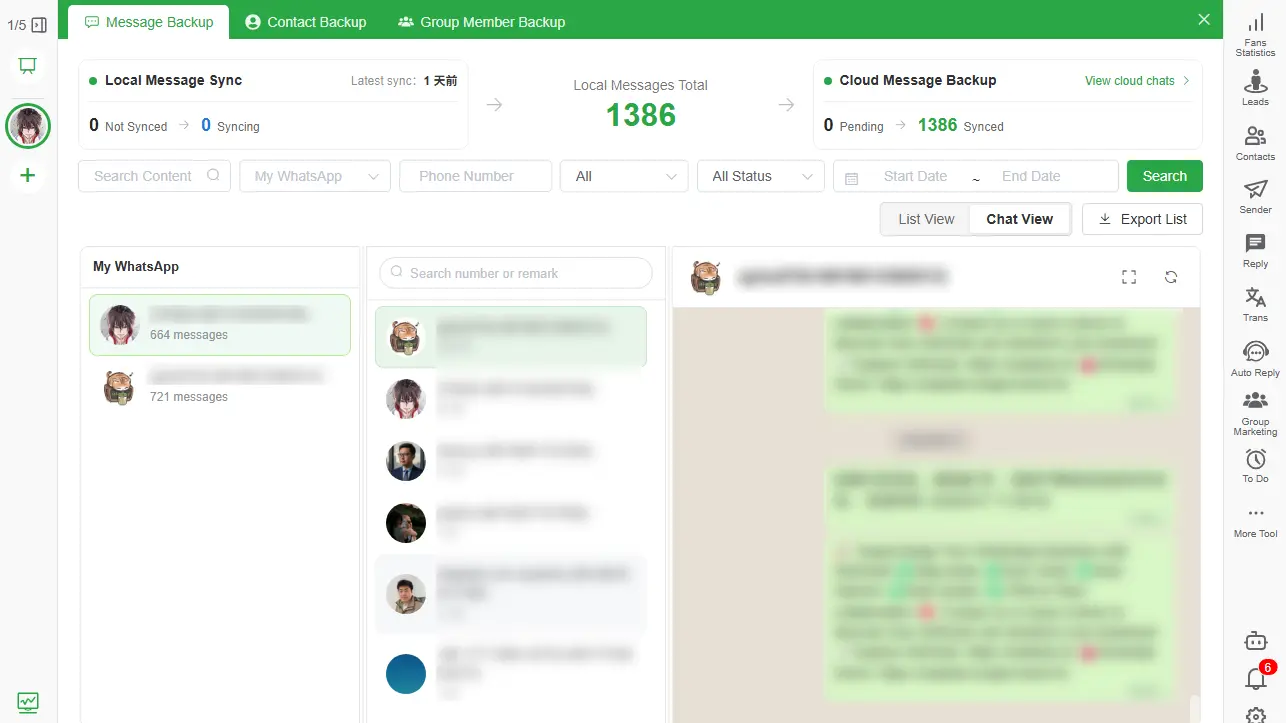
After data is successfully saved to the local Backup Center, available filters can help you narrow records by:
- Message keyword.
- WhatsApp account.
- Contact or phone number.
- Date range.
- Message type or status.
- Saved and unsaved contacts.
- Group and member information.
Conversation view is useful when context matters. List view is better when you need to inspect many messages or compare fields quickly.
How to view a local backup
- Open WABak on the computer where the backup was created.
- Enter Chat Backup and choose the relevant WhatsApp account.
- Search for the contact, number or keyword.
- Apply a date or message-type filter when the result set is large.
- Open conversation view to read the surrounding thread.
- Switch to list view for structured review.
- Export the required records if another authorized person needs access.
How to find a message efficiently
Start with the most distinctive information you know. An invoice number, product code, phone number or uncommon phrase usually works better than a broad word such as “order.”
Then reduce the result set:
- Select the correct account.
- Restrict the date range.
- Choose a contact when known.
- Filter by message type if you are looking for a document or media record.
- Open the surrounding conversation before drawing a conclusion from one message.
Can you view the backup after losing WhatsApp access?
Previously completed local records remain available in WABak for viewing, searching and export. WABak cannot continue synchronizing an inaccessible account and cannot retrieve data that was never saved.
That boundary is why verification matters. Open representative chats after every important backup instead of waiting for an account problem to discover that a required record was missing.
Export a result for offline reading
Use HTML when you need a readable conversation. Use Excel when you need rows that can be filtered and analyzed. Save supported media with the export when attachments are part of the context.
For the full process, read How to Export WhatsApp Chats to HTML with Media for searching saved backups.
Privacy checklist
- Use an operating-system account with a strong password.
- Enable disk encryption where appropriate.
- Restrict access to the WABak computer and export folders.
- Avoid placing exports in automatically synchronized folders unless that is intentional.
- Delete temporary copies after approved sharing is complete.
- Keep a protected second copy when the records are business-critical.
Local storage provides control, but the computer still needs to be protected.
Where can you find a WhatsApp backup on a PC?
First identify the backup type. Google Drive and iCloud backups are managed through WhatsApp's restore flow and do not normally appear as readable conversation folders. Android database files may exist on a phone, but copying an encrypted file to a PC does not turn it into a chat viewer. Completed WABak records are opened from the Backup Center on the computer where they were saved.
This is where WhatsApp backup viewer and search software turns a saved copy into records a team can actually use.
How to check whether the required messages were backed up
Do not rely only on a total count or a successful status. Select the correct WhatsApp account, open two or three important contacts, compare a recent date and search for a distinctive message. Check supported media when an attachment is part of the record. This verifies the usable result rather than merely confirming that a task ran.
A practical search example
Suppose you need an invoice discussion from several months ago. Start with the account that handled the customer, search the invoice number or an uncommon phrase, narrow the date range and then select the contact. Open conversation view to confirm context. Use list view when you need to compare timestamps or scan many results, and export only the authorized records needed for the next task.
Choose a readable archive for viewing
A readable archive does not decrypt a Google Drive or iCloud restore backup, recreate deleted messages or continue syncing after an account becomes inaccessible. WABak can only display records that completed successfully while the account data was still available.
Frequently asked questions
Can I open a Google Drive WhatsApp backup on a PC?
Not as a normal readable chat archive. It is intended for WhatsApp’s restore process. Create a separate readable export or local archive when you need computer access.
Can I search all backed-up chats at once?
WABak’s local Backup Center provides message search and filters across available backed-up records. The exact result depends on what was successfully saved.
Can I view photos and documents?
Supported media can be viewed or exported when it was accessible and saved during backup. Missing historical attachments cannot be recreated.
Does WABak recover deleted messages?
WABak can show data already saved in its local backup. It does not recover messages that were deleted or unavailable before backup.
Where does WABak store completed backup records?
Completed backup records are stored on the computer running the WABak client. You control the folders used for exported HTML, Excel and supported media files.
How do I check the last useful WhatsApp backup?
Check the completion status, then open representative chats and search for a recent known message. A timestamp alone does not prove that every required record or attachment was available.
Related WhatsApp backup guides
- preparing for account-access loss for searching saved backups
- choosing between backup and export for searching saved backups
For the complete product workflow, see the WhatsApp backup viewer and search software.
Make your WhatsApp backup usable
The value of a backup is not the file count—it is whether an authorized person can find the required record when needed. Explore WhatsApp backup viewer and search software to create a searchable local archive on Windows or macOS.
WhatsApp Chat Backup to PC Without Cloud Storage
A practical guide to creating a readable, searchable WhatsApp chat backup on your computer while keeping control of messages, media, contacts and group records.
How to Export WhatsApp Chats to HTML with Media
Learn when HTML is better than TXT or Excel, how to preserve supported media, and how to verify a readable local WhatsApp archive.